OpenAPI Specification
What Is OpenAPI?
- It is a broadly adopted industry standard or specification for describing RESTful API, which can be written in YAML or JSON format.
- The other two specifications used for describing RESTful API are
- RAML
- Written in YAML format
- API Blueprint
- Written in Markdown format
Advantage using OpenAPI
- Understand by machines and humans.
- one can generate both server and client code in any programming language.
- use mock servers to provide example responses which enable both consumers and producers to start development at a same time.
- can perform the validation in both direction
Open API Structure
- openapi
stringrequired- The openapi field SHOULD be used by tooling specifications and clients to interpret the OpenAPI document. This is not related to the API info.version string.
{
  "openapi": "3.0.0",
}
{
  "swagger": "2.0",
}
-
info (6)
required- Provides metadata about the API. The metadata MAY be used by tooling as required. -
title
required - description
- termsOfService
- contact
- name
- url
- license
- name
required - url
- name
- version
required
{
  "title": "Sample Pet Store App",
  "description": "This is a sample server for a pet store.",
  "termsOfService": "http://example.com/terms/",
  "contact": {
    "name": "API Support",
    "url": "http://www.example.com/support",
    "email": "support@example.com"
  },
  "license": {
    "name": "Apache 2.0",
    "url": "https://www.apache.org/licenses/LICENSE-2.0.html"
  },
  "version": "1.0.1"
}
-
servers (3) - If the servers property is not provided, or is an empty array, the default value would be a Server Object with a url value of /.
-
url
required - description
-
variables
- enum
- default
required - description
A single server would be described as:
{
  "url": "https://development.gigantic-server.com/v1",
  "description": "Development server"
}
multiple servers can be described
      {
        "servers": [
          {
            "url": "https://development.gigantic-server.com/v1",
            "description": "Development server"
          },
          {
            "url": "https://staging.gigantic-server.com/v1",
            "description": "Staging server"
          },
          {
            "url": "https://api.gigantic-server.com/v1",
            "description": "Production server"
          }
        ]
      }
variables can be used for a server configuration
{ "servers": [ { "url": "https://{username}.gigantic-server.com:{port}/{basePath}", "description": "The production API server", "variables": { "username": { "default": "demo", "description": "this value is assigned by the service provider, in this example `gigantic-server.com`" }, "port": { "enum": [ "8443", "443" ], "default": "8443" }, "basePath": { "default": "v2" } } } ] } -
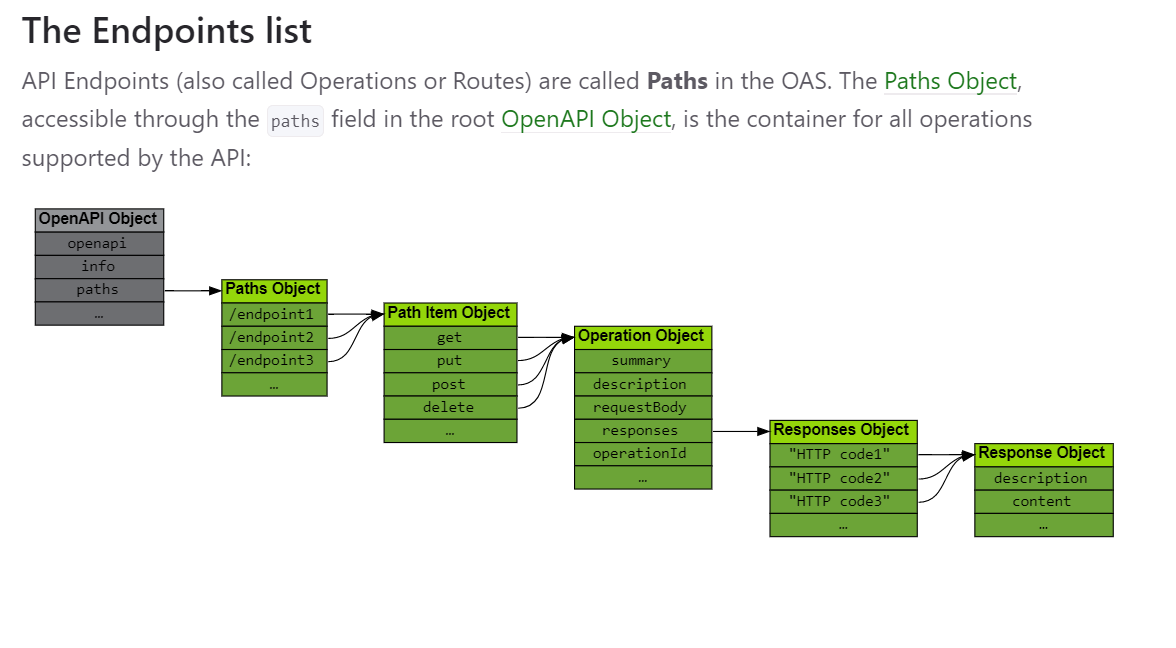
paths
reqired- The available paths and operations for the API. -
Path Item (13) - A relative path to an individual endpoint. The field name MUST begin with a forward slash (/)
- $ref
- summary
- description
- get
Operation Object - put
Operation Object - post
Operation Object - delete
Operation Object - options
Operation Object - head
Operation Object - patch
Operation Object - trace
Operation Object - servers
-
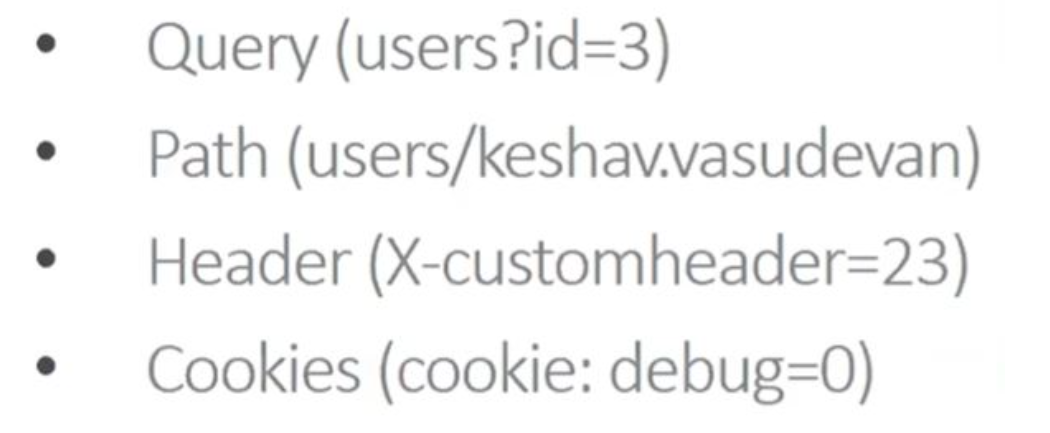
parameters (4) (There are four possible parameter locations specified by the
infield:) -
path
- query
- header
- cookie
-
components (9) - An element to hold various schemas for the specification.
-
schemas
- Type
- Format
-
responses
The Responses Object MUST contain at least one response code, and it SHOULD be the response for a successful operation call.- description
required -
headers
-
content
- links
{ "200": { "description": "a pet to be returned", "content": { "application/json": { "schema": { "$ref": "#/components/schemas/Pet" } } } } } - description
-
parameters
- examples
- requestBodies
- description
- content
- required
- headers
- securitySchemes
- links
- operationRef
- operationId
- parameters
- requestBody
- description
- server
-
callbacks
-
security - A declaration of which security mechanisms can be used across the API.
- {name} - Each name MUST correspond to a security scheme which is declared in the Security Schemes under the Components Object.
-
tags - A list of tags used by the specification with additional metadata.
-
name
- description
- externalDocs - Additional external documentation.
- description
- url
        {    "tags":
              [
                          {"name": "pet",
                           "description": "Everything about your Pets",
                           "externalDocs": {
                                            "description": "Find out more",
                                            "url": "http://swagger.io"}
                          },
                          {"name": "store",
                           "description": "Access to Petstore orders"
                           },
                          {"name": "user",
                           "description": "Operations about user",
                            "externalDocs": {
                                          "description": "Find out more about our store"
                                          "url": "http://swagger.io"}
                        }
              ]
         }
Difference between 2.0 and 3.0
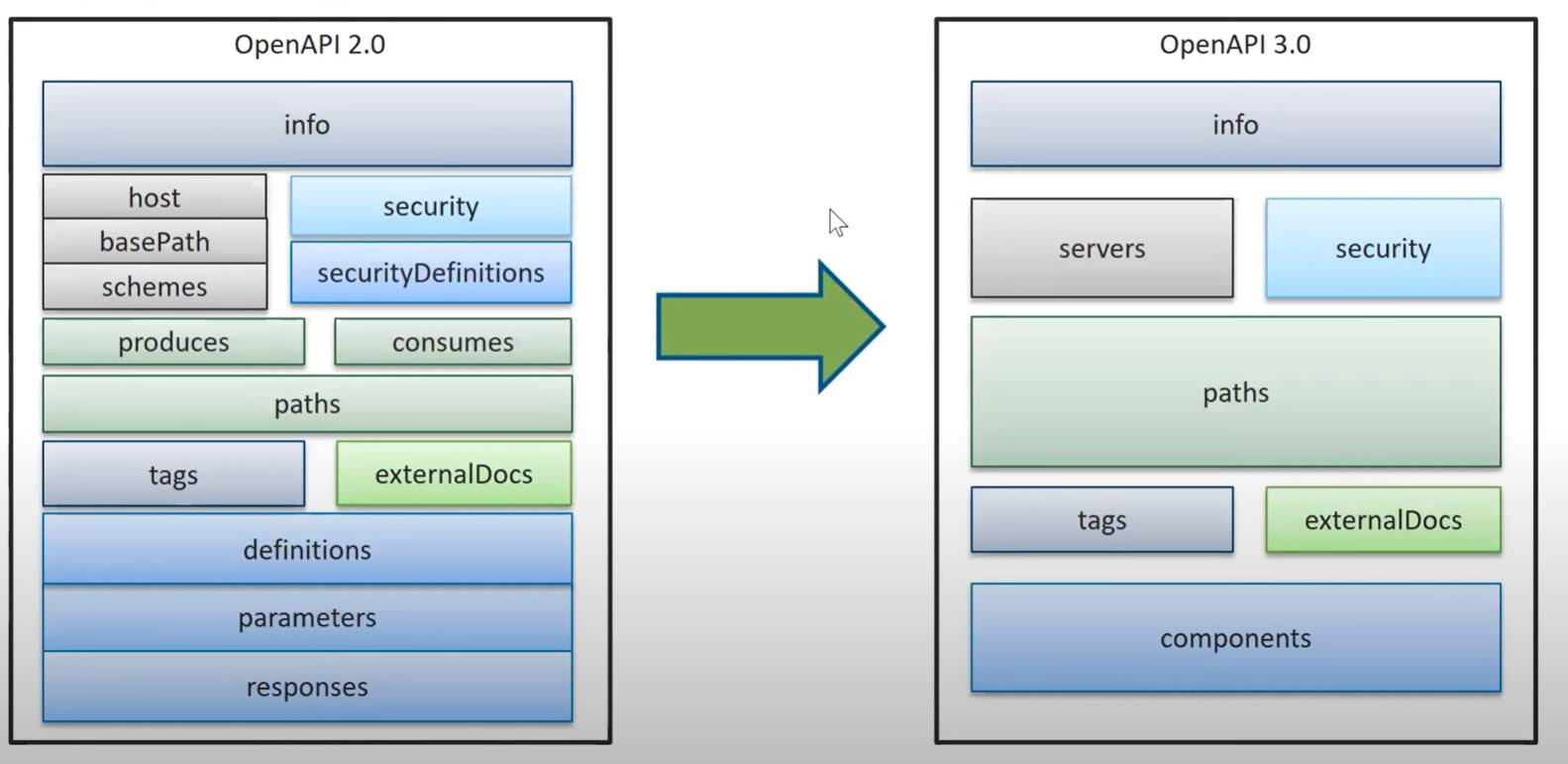
Object Flows